Picture-in-Picture,
But Supercharged.
PiP+ keeps your subtitles, danmaku, and controls intact. Set it once, enjoy forever.
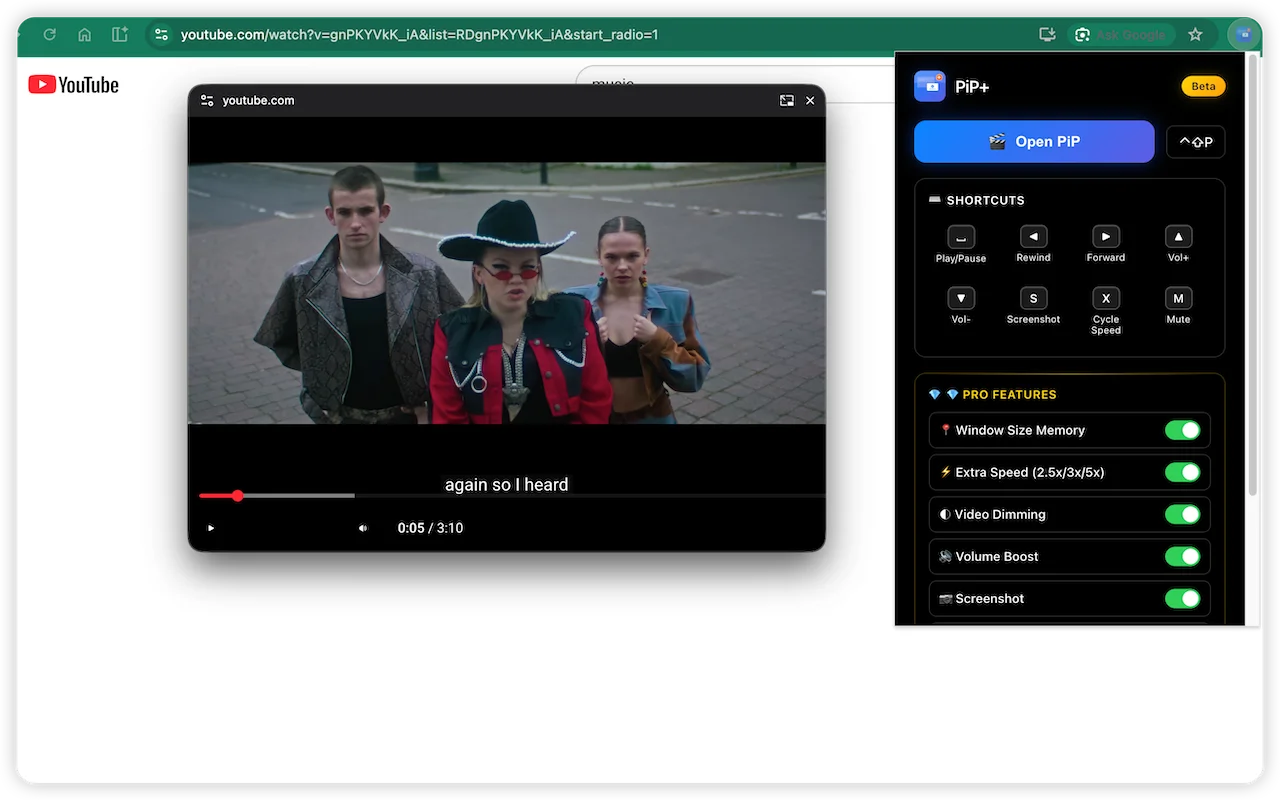
What is PiP+?
The Ultimate Picture-in-Picture Experience
PiP+ is not just another floating video player. It is a powerful Chrome extension designed to solve the biggest frustration of native Picture-in-Picture: the loss of subtitles and danmaku. Whether you're watching Netflix with English subtitles, learning a new language with dual captions, or enjoying Bilibili with real-time danmaku comments, PiP+ ensures your viewing experience remains complete.
By intelligently capturing the subtitle layer from streaming services like Netflix, YouTube, Disney+, and Prime Video, and syncing with Bilibili's unique danmaku system, PiP+ ensures you never miss a word, a joke, or a community reaction while multitasking. It's the perfect tool for remote workers, students, language learners, and anyone who wants to watch videos while staying productive.
Works Everywhere You Watch
Optimized for major streaming platforms including Netflix, YouTube, Bilibili, Disney+, Prime Video, Twitch, and Apple TV+. Compatible with almost any HTML5 video player on the web.






Video
Also supports Hulu, HBO Max, Vimeo, Coursera, Udemy, and any website using standard HTML5 video players.
Features Included Free
Core features work out of the box, no payment required. Everything you need for a better Picture-in-Picture experience.
Subtitles & Danmaku
Keep Netflix, YouTube, Disney+ subtitles and Bilibili danmaku comments visible in PiP mode. Never miss dialogue or community reactions.
Playback Controls
Full keyboard controls: Space to play/pause, arrow keys to seek, volume adjustment, and more — all working in the floating window.
Basic Speed Control
1.0x / 1.25x / 1.5x / 2.0x speed adjustment for faster learning or slower comprehension.
Progress Bar
Visualized progress bar with drag-to-seek support. Jump to any point in the video with precision.
Designed for Your Workflow
See how PiP+ boosts your productivity and entertainment across different scenarios.
Language Learners
Watch foreign films on Netflix or YouTube with dual subtitles in a floating window while taking notes in your favorite app. Perfect for learning English, Japanese, Korean, or any language through immersive video content.
Developers & Designers
Keep coding tutorials, API documentation videos, or design references visible in the corner of your screen without constantly switching tabs. Code along with YouTube tutorials or Udemy courses in real-time.
Sports Fans
Never miss a goal, touchdown, or game-winning shot. Keep the live game from ESPN, YouTube TV, or Twitch pinned while you work, browse, or chat with friends. Stay updated without leaving your workflow.
Anime & Danmaku Lovers
The only PiP tool that correctly renders Bilibili danmaku comments, preserving the authentic community viewing experience. Watch anime with scrolling comments just like on the original page.
How It Works
Set up once, enjoy forever. PiP+ runs in the background and handles everything automatically.
Install Extension
Add PiP+ from the Chrome Web Store with one click.
Click to Pop Out
Click the extension icon or use the keyboard shortcut to activate PiP.
Enjoy Full Experience
Watch with subtitles, danmaku, and controls — all in the floating window.
🔧 How PiP+ Preserves Subtitles
The Problem with Native PiP
The browser's native Picture-in-Picture API only extracts the <video> element itself. Subtitles on Netflix, YouTube, Bilibili are separate layers overlaid via CSS or Canvas - they're not part of the video stream, so they get lost when entering PiP mode.
PiP+'s Solution
PiP+ uses the Document Picture-in-Picture API to move the entire video container (including subtitle layers, danmaku layers, control bars) as a complete DOM structure into the PiP window. This preserves all HTML5 video overlays for a true "what you see is what you get" PiP experience.
Technical reference: Document Picture-in-Picture API (Chrome Developers)
💡 Works with all HTML5-based streaming platforms: Netflix, YouTube, Bilibili, Disney+, Prime Video, Twitch, Apple TV+ and more
Tired of Losing Subtitles in Picture-in-Picture?
- Subtitles vanish in PiP mode
- Danmaku completely lost
- Window position resets every time
PiP+ Solution
- Keep Netflix, YouTube, Disney+ subtitles and Bilibili danmaku comments visible in PiP mode. Never miss dialogue or community reactions.
- Full keyboard controls: Space to play/pause, arrow keys to seek, volume adjustment, and more — all working in the floating window.
- Visualized progress bar with drag-to-seek support. Jump to any point in the video with precision.
PiP+ vs Native PiP
See how PiP+ compares to Chrome's built-in Picture-in-Picture.
| Feature | PiP+ | Native PiP |
|---|---|---|
| Subtitle Support | ||
| Danmaku Support | ||
| Playback Controls | ||
| Window Memory | ||
| Opacity Control |
Chrome's native PiP only displays the video stream itself, unable to preserve subtitle and danmaku overlay layers. PiP+ solves this with the Document Picture-in-Picture API for a complete viewing experience.
Who Uses PiP+?
Whether you're binge-watching Netflix series, learning from YouTube tutorials, or multitasking at work — PiP+ adapts to your workflow.
Binge Watchers
Keep watching Netflix, Disney+, or HBO Max while browsing social media or shopping online, with full subtitles support for every episode.
Multitaskers
Watch coding tutorials while writing code, or follow along with online courses while taking notes. Never pause your learning or productivity.
Bilibili Fans
Full danmaku experience even in PiP mode. Don't miss the fun comments and reactions from the community while multitasking.
Students
Take notes while watching lectures, online courses, or educational videos. Maximize your study efficiency with side-by-side learning.
Unlock Pro Features
One-time payment. No subscriptions. Use forever.
Lifetime License
⏰ Limited to first 100, then $12.99
- Window Size & Position Memory
- Extra Speed (2.5x / 3x / 5x)
- Opacity Control
- Volume Boost (up to 300%)
Frequently Asked Questions
Everything you need to know about PiP+.
Ready to Upgrade Your PiP?
Download PiP+ now and never lose subtitles again.
 Get PiP+ — Free
Free download • No account required • Chrome 88+